
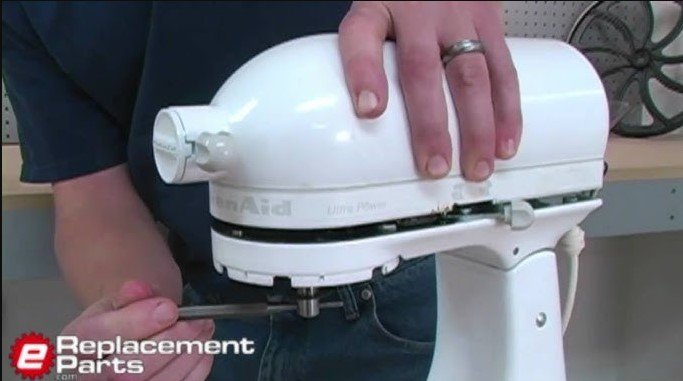
If your KitchenAid mixer suddenly refuses to start, don’t panic! Most issues are caused by simple power connectivity problems, tripped circuit breakers, or an improperly engaged speed control lever. Follow our guide to safely troubleshoot your machine and restore it to perfect working order.
There is nothing quite as frustrating as being ready to whip up a batch of your favorite cookies, only to realize that your trusty KitchenAid stand mixer is completely unresponsive. You have the flour measured, the butter softened, and the recipe pulled up, but when you flip the switch, the machine stays silent. You might find yourself staring at the appliance, asking, “Why wont my KitchenAid mixer turn on?” while your ingredients sit waiting on the counter.
The good news is that these mixers are legendary for their durability. In almost every case, when a KitchenAid mixer will not turn on, the issue is not a total motor failure. Instead, it is usually a minor electrical hiccup or a simple safety mechanism that has been triggered. By taking a few minutes to walk through a systematic diagnostic process, you can often fix the problem yourself without needing to ship the unit off for professional repairs.
Key Takeaways
- Power Basics: Always check your outlet and power cord first, as simple electrical interruptions are the most common cause.
- Speed Lever Check: The mixer will not start if the speed control lever is not pushed firmly into the “0” or “Off” position before moving to a speed.
- Circuit Protection: A tripped GFCI outlet or a blown household breaker can prevent your mixer from receiving the necessary electricity.
- Internal Fuses: Some models feature an internal thermal fuse designed to protect the motor from overheating; these may need professional replacement.
- Safety First: Never attempt to disassemble your mixer while it is plugged into a wall outlet to avoid the risk of electrical shock.
Checking the Power Source and External Connections
Before you start worrying about the inner workings of your machine, let’s look at the most obvious culprit: the power supply. It sounds simple, but you would be surprised how often a loose connection or a tripped outlet is the reason behind a “broken” appliance. The very first step when asking why wont my KitchenAid mixer turn on is to verify that electricity is actually reaching the unit.
Testing the Wall Outlet
Start by unplugging the mixer and plugging in a different small appliance, like a desk lamp or a phone charger, into the exact same outlet. If the other appliance does not work, the problem is not your mixer—it is your kitchen outlet. Check your home’s electrical panel to see if a circuit breaker has tripped. If you are using a GFCI outlet (the kind with the little “test” and “reset” buttons), press the reset button firmly. These outlets are common in kitchens and can trip easily if there is a minor power fluctuation.
Examining the Power Cord
Inspect the entire length of the mixer’s power cord for any visible signs of damage, such as fraying, cuts, or pinched spots. Kitchens are busy places, and sometimes heavy appliances or sharp edges can damage a cord over time. If the cord looks perfectly fine, ensure it is pushed all the way into the wall outlet. Sometimes, a cord can work its way loose over years of use, preventing a solid electrical connection.
Understanding the Speed Control and Safety Mechanisms
KitchenAid mixers are designed with several safety features to protect both the user and the motor. These features are great for longevity, but they can be confusing if you do not know how they interact with the start-up process. A common reason why wont my KitchenAid mixer turn on is that the speed control lever is not in the correct starting position.

The “Zero” Position Requirement
Most KitchenAid stand mixers require the speed control lever to be in the “0” (Off) position before you move the lever to a specific speed. If you accidentally bump the lever into a speed setting while the mixer is unplugged and then plug it back in, the machine’s safety logic might prevent it from starting. Always return the lever to “0” first, and then firmly slide it to your desired speed. If it still does not turn on, try moving it back and forth between “0” and “1” a few times to ensure the internal switch is making proper contact.
Head Lock and Tilt-Head Issues
If you own a tilt-head model, ensure that the head is fully locked in the downward position. There is a small safety switch that prevents the motor from engaging if the head is not completely secured. If the head is slightly tilted or if the locking lever is not fully engaged, the motor will not receive power. Give the head a firm downward press to ensure the locking mechanism has clicked into place.
Investigating Thermal Overload and Motor Issues
If your mixer was working fine earlier but suddenly stopped mid-batch, it might have experienced an overload. KitchenAid mixers have built-in protection systems designed to prevent the motor from burning out if it gets too hot or if the load is too heavy. If you were mixing a particularly stiff bread dough or had the mixer running at a high speed for an extended time, this could be the reason why wont my KitchenAid mixer turn on.
Thermal Overload Protection
When the motor overheats, the thermal overload protection will trip. This is essentially a “cool-down” period. If you suspect this is the case, unplug the mixer and let it sit undisturbed for at least 30 to 60 minutes. Once it has cooled down completely, try turning it on again. Many times, the internal reset will click back into place on its own once the temperature drops, and the machine will resume working.
Signs of a Blown Internal Fuse
Some newer or specific commercial-style models contain an internal thermal fuse. Unlike a resettable breaker, a thermal fuse is a one-time safety component. If the fuse blows, it must be replaced. This usually happens due to a significant electrical surge or extreme motor strain. If you have waited an hour and the mixer still shows no signs of life, a blown internal fuse is a likely culprit. This repair requires opening the casing, so if you are not comfortable with tools, this is the time to contact a professional repair shop.
Maintenance Tips to Keep Your Mixer Running
An ounce of prevention is worth a pound of cure. To ensure you never have to ask why wont my KitchenAid mixer turn on again, you should incorporate basic maintenance into your baking routine. Proper care keeps the electrical components clean and the mechanical parts moving smoothly.
Keep the Speed Control Clean
Flour, sugar, and bits of dough can accumulate around the speed control lever and the pivot points of the mixer head. Over time, this debris can harden and prevent the lever from making a proper electrical connection. Use a soft, dry brush to keep the area around the speed lever clean. Avoid using heavy liquids or water sprays near the controls, as moisture can cause corrosion or short circuits.
Don’t Overload the Motor
While these machines are powerful, they are not invincible. When making bread or heavy cookie dough, start on the lowest speed. If you notice the mixer struggling, vibrating excessively, or making a straining sound, stop the machine. Divide the dough into smaller batches. Pushing the machine beyond its capacity is the fastest way to trigger thermal protection or blow an internal fuse.
When to Seek Professional Repair
Sometimes, despite your best efforts, the answer to why wont my KitchenAid mixer turn on requires professional eyes. If you have verified that the wall outlet is working, tested the power cord, and let the motor cool down, but the machine is still silent, there may be a failure in the internal wiring or the speed control plate itself.
Identifying Worn Internal Parts
Over many years of heavy use, the carbon brushes in the motor can wear down. These brushes are what deliver power to the spinning parts of the motor. When they become too short, the electrical current is broken, and the mixer will simply stop running. This is a common and relatively inexpensive repair, but it involves disassembling the motor housing, which is best left to someone with experience.
Choosing a Repair Shop
If your mixer is still under warranty, do not attempt to open the housing yourself, as this will void your coverage. Check your purchase date and contact KitchenAid customer support. If the warranty has expired, look for a local appliance repair shop that specializes in small kitchen electronics. Many cities have specialized repair cafes or shops that focus on restoring vintage and modern stand mixers, often for much less than the cost of a new machine.
Getting your mixer back in action is usually a straightforward process of elimination. By checking the power, the safety switches, and the motor’s temperature, you will likely find the solution quickly. Remember that these machines are built to last a lifetime, and a little troubleshooting is just part of being a home baker. Keep your machine clean, use it within its limits, and it will be ready for your next culinary adventure.
Conclusion
The question of why wont my KitchenAid mixer turn on can be stressful, but it is rarely the end of the road for your favorite kitchen companion. From simple outlet resets to understanding the importance of the “zero” position, the fixes are often simple and require no special tools. By following these steps, you can troubleshoot the issue safely and confidently. If you do find yourself needing professional help, remember that these machines are highly repairable, making them an investment that pays off for years to come. Now, get back to that kitchen—there is baking to be done!
Frequently Asked Questions
What do I do if my mixer makes a clicking sound but won’t start?
A clicking sound often indicates that the speed control lever is not engaging the switch properly or the motor is stuck. Try moving the speed lever firmly through all settings a few times and ensure there is no debris blocking the movement of the speed control assembly.
Is it safe to open the motor housing myself?
Only open the housing if you are comfortable with small electronics and the unit is unplugged. If the mixer is still under warranty, do not open it, as this will void your manufacturer’s coverage.
Why does my mixer stop while I am kneading dough?
This is likely a sign that the motor is overheating, causing the thermal overload protector to trip. Stop the mixer, unplug it, and allow it to cool down for at least 45 minutes before trying a smaller batch of dough.
Can a power surge damage my mixer?
Yes, a significant electrical surge can blow the internal thermal fuse, which is designed to protect the more expensive motor. If a surge occurred, the mixer may require a fuse replacement by a professional.
Do I need to oil my KitchenAid mixer?
Most modern KitchenAid mixers are permanently lubricated at the factory. You generally do not need to oil them, but if you hear grinding noises, it may be time for a professional gear inspection.
How often should I have my mixer serviced?
If you use your mixer for light tasks occasionally, it may never need professional servicing. However, for heavy bakers who use the machine weekly, a professional tune-up every 5 to 7 years can help ensure the internal gears and grease are in good condition.